

Facebook Business Page Redirects to Facebook’s Homepage?

Does your Facebook Business Page automatically redirect to Facebook’s Homepage? Or can you only see your page when you’re logged in?
This question has popped up many times from clients in the past few months so I decided to write about it.
**NOTE, since this article was written, Facebook has implemented a “log in” pop-up window, (to get folks to either join or log in) but this doesn’t mean that the page isn’t public. (users and Google can see your content) You can simply close the window or log in.
If this is happening to your business page, this is obviously bad for your site’s search engine results. In other words if the search engines can’t see it, then your customers (and many potential others) can’t find it either!
How to check to see if your page is view-able without being logged in: Make sure you’re logged out of Facebook.com *then* visit your Facebook Business Page. If you can see the page, you’re good.
Pretty simple… in most cases it’s simply the “permissions” that are set incorrectly. Remember there are literally millions of different types of Facebook Business Pages out there, each with specific information, audiences and needs. What?? Yes, some FB pages can to be viewed (or blocked) by different languages, ages and some are even blocked by IPs, words and other FB accounts.
*Note: Facebook does a pretty darn good job at making their technology as robust and configurable as possible. So don’t complain… just learn how to use it! ;)
So, to verify your security settings and to leave your page “wide open” for all to see:
1) Log in
2) Go to your business page
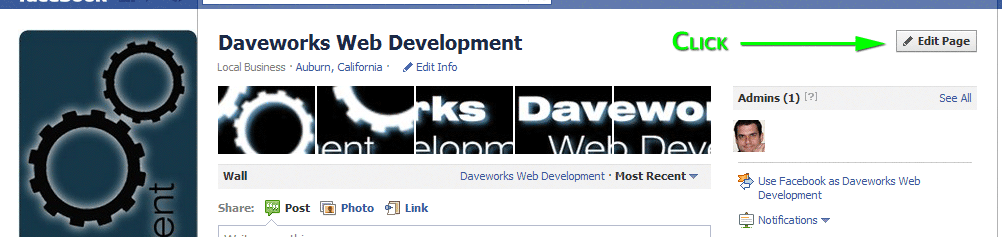
3) Click “Edit Page”
4) Check the most popular culprits of this issue:
a. Country Restrictions – uncheck it
b. Age Restrictions – choose Anyone (13+)
Click “Edit Page”
Check the most popular culprits of this issue:
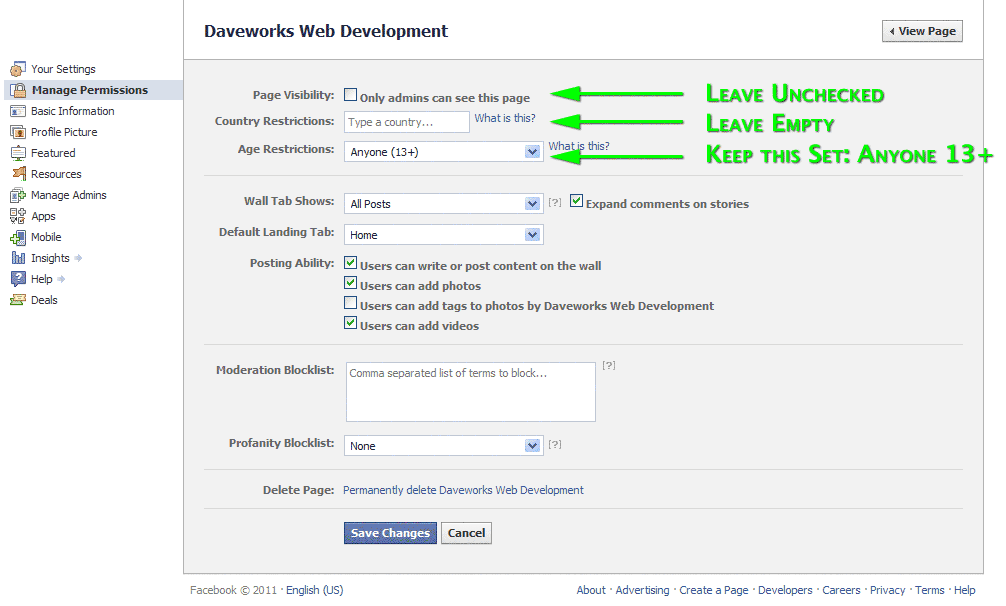
Here are excerpts from Facebook explaining some of these elements:
Countries:
Entering one or more countries means that only people located in those countries listed will be able to view your Page. This also means that logged out users will not be able to see your Page. If no countries are listed, your Page will be visible to people located in all countries. You understand that you are responsible for setting the proper country restrictions to ensure that the content of your Page is appropriate for the country or countries where you allow it to be visible.
Age:
Selecting an age restriction means that anyone under the specified age will not be able to find your Page in search or on friends’ profiles or view the content in other ways. This also means that logged out users will not be able to see your Page.
The Alcohol-Related age restriction sets the minimum age based on the location of the user. Only users in Canada, South Korea or Nicaragua who are 19+, in Japan, Iceland or Paraguay who are 20+, in Cameroon, Micronesia, Palau, Solomon Islands, Sri Lanka or the U.S. who are 21+, in India and Sweden who are 25+, and elsewhere who are 18+ will be able to view your Page. You understand that the Alcohol-Related age restriction is for convenience and that Facebook does not represent that by using that setting your Page will be legally compliant in all countries where your Page is visible. You understand that ultimately you are responsible for setting the proper legally compliant age restrictions for each country where your Page is visible.
Keywords:
You can add comma-separated keywords to the “Moderation Blocklist”. When users include blacklisted keywords in a post and or a comment on your Page, the content will be automatically marked as spam. More information can be found here. Facebook will block the most commonly reported words and phrases marked as offensive by the broader community.
Still locked out? Leave a comment below and I’ll have a look.
Cheers,
//D
DID ARTICLE THIS HELP YOU?
If so, and you think I’ve earned it,
please LIKE the Daveworks Facebook Page.
|


S Blakely
August 10th, 2011 at 5:05 pm
Thanks! I was having this problem today and was lucky enough to find your site. My problem is now solved.
Dave
August 18th, 2011 at 12:17 am
So glad it helped! Thanks for the comment… keeps me motivated. =)
John
August 19th, 2011 at 8:18 pm
I’m trying to set-up a simple redirect for a client so that http://www.CLIENTNAME.com goes to the client’s Facebook page (Facebook.com/CLIENTNAME) using a META redirect. The problem is that the redirect gets to a Facebook landing page that has a link that will take me to the right page, but that intermediate step will just confuse the hell out of my client’s clients. Grrr…
Directly pasting the URL works fine, so I know this is an annoying Facebook issue.
Dave
August 24th, 2011 at 8:53 pm
Hi John,
Thanks for the comment…
So you’re doing something like:
<meta http-equiv=”refresh” content=”0;URL=http://facebook.com/CLIENTNAME”>
and you’re getting an intermediate landing page? (hard to see what you’re talking about without taking a peek) But I’m guessing they have a custom “Like” page? If so, you could get users right to the client’s FB wall, which would bypass the “Like” but that kinda defeats the purpose, yes?
i.e.: Instead of
<meta http-equiv=”refresh” content=”0;URL=http://www.facebook.com/daveworks”>
You could do something like
<meta http-equiv=”refresh” content=”0;URL=http://www.facebook.com/daveworks?sk=wall”>
Or have I missed something? Happy to help, so if you want to ping me privately, just go to http://daveworks.net/web-design-development-tips/contact-us/ and I’ll see what I can do.
Cheers!
P.S. Check out our redirect post as well: http://daveworks.net/web-design-development-tips/web-development/how-to-redirect-your-website/ (might have a better solution compared to a meta redir)
LouLou
September 25th, 2011 at 12:54 pm
Thanks so much!! I was going insane trying to fix this issue!!
Problem solved!!
Made my day! :)
http://www.facebook.com/djayloulou
Dave
September 25th, 2011 at 10:27 pm
Ya Velcome, Dahling. =) Pulled our hair out trying to figure this one, too! Please pay it forward and “Share” it with others to help keep others from going insane? Cheers, //D
And since you were nice enough to write in with kind words, you may keep the backlink.
;)
Dan
November 22nd, 2011 at 2:07 am
Thanks Dave,
I’m sitting here in The Philippines wondering why my FB decided to stop working for me.
The country restrictions was the problem. Fixed!
http://www.thisboundlessworld.com
Thanks again!
Dave
November 28th, 2011 at 9:42 pm
My pleasure, Dan…
Keep checking your FB page accessibility once in a while as FB continues to make changes.
=)
Cheers!
Proxy Man
December 15th, 2011 at 10:05 am
Supposed for all of these explanations and extra, it be able to be blank to use a loose web proxy provider in browsing the internet, and present are a lot of online to select from. A plain and basic seek from engines like google will reveal with loads of thousands of loose web proxy sites; however, it’s imperative to be responsible that the most important section smartly-appreciated of these loose services and products be inclined to run awfully sluggish.
Kim Andriole
January 13th, 2012 at 4:30 am
Hi Dave.
I am experiencing the same issue. There are several facebook pages that are named Shine On; but, I went on and named my page Shine On as that is the name of my business.
I created the page and could not find it. That is why I chose the option to invite people from my email contact list. I thought this would take them directly to my page. Unfortunately, it is not. It is taking them to the FB homepage. This is extremely frustrating as I am trying to launch the business.
I checked the simple things you mentioned above…country, age, etc. I also think the page is published as the option listed is to unpublish it.
Any thoughts?
Your help is greatly appreciated.
The sooner the better:):)
PS Website Design Leeds
January 16th, 2012 at 9:55 am
Brilliant – age restrictions as you said!
Why would a company as large as FB not inform the user: change this = effect!
Thanks for the post Dave.
Dave Naves
January 18th, 2012 at 9:49 pm
Thanks for the comment… You’d think they would inform us, but I believe the answer is that they are fighting so many battles right now, (including the many businesses simply not being social) and are far more concerned with making profits. I mean if you think about it… a company which has over 800,000,000 users only brings in $4 billion dollars a year? (and it costs them a substantial portion of that to keep the company running) They have much to do! =)
Cheers,
//D
Dave Naves
January 18th, 2012 at 10:09 pm
Hi Kim,
Thanks for the note… sorry for the late reply. We’ve been completely inundated with work and just now had a few mins to check comments.
So obviously you’ve found your page (https://www.facebook.com/pages/Shine-On/249726175098845) because I see that folks have been commenting. (great)
Thought I’d share a quick advanced searching tip via Google. (how I found your facebook page) In the input field at Google.com I keyed in:
kim andriole shine site:facebook.com and found your FB link immediately. (the “site:facebook.com” in that query tells Google to only display results from that specific domain)
Also note, that sometimes FB has delays in getting their own pages indexed in their own search engine, so that may have been the reason. (although you can always go to your personal profile page and it should be linked right under your profile pic. =)
And in case you didn’t konw, now that now you have over 25 “Likers” on your page, you can grab a “vanity url” like facebook.com/shineon (if available) Check to see here: http://facebook.com/username
Thanks again for writing,
//D
Jen
January 26th, 2012 at 7:50 am
Hi Dave,
I have verified the all the restraictions are unchecked, yet my Mueller & Co., LLP page is still not visible unless I’m logged into FB, please help.
Thanks,
J
Dave Naves
January 26th, 2012 at 10:01 am
Hi Jen,
Thanks for the comments… your page (https://www.facebook.com/pages/Mueller-Co-LLP/227712130630458) *is* indeed viewable without being logged in. Sometimes cache weirdness occurs and you either have to restart your computer, clear your browser cache or simply wait. But I just logged out and was able to see it just fine. (and “Liked” it) Perhaps you could do the same for us? ;^ )(https://www.facebook.com/daveworks)
So, you’re all good.
=)
Cheers,
//D
Cary
February 16th, 2012 at 9:36 am
As a novice facebook Page user, set up Page for my professional organization, East African Society of Investment Professionals. And I created a username http://www.facebook.com/easip. In trying to merge with an earlier page of same name, the new /easip user name redirects to my personal page. I have checked all settings as you instructed above. Did I make a fatal error? I don’t seem to be able to edit or alter the /easip address to get it to go to its proper professional page.
Renee Cologne
February 16th, 2012 at 10:39 am
Dave,
Thanks for your blog. I am not a web developer or programmer and so don’t speak the “language” of what some other commenters are referring to, but . . . I have a question that I wonder if there is a simple solution to, and that is:
I have a FB business page that already has a username; i.e. ‘facebook.com/rcshelter’. For SEO and trafficking purposes, I would like to create a “dummy” page ‘Facebook.com/whatidomytown’ (for instance) that POINTS or REDIRECTS to the ACTUAL rcshelter Facebook page.
Is there a way to do this? Or should I say, is there a fairly simple way to do it, given that I’m not a programmer?
Many thanks in advance for your consideration,
Renee Cologne
Dave Naves
February 16th, 2012 at 8:57 pm
Hi Renee,
Thanks for your question. The short answer is no, there is no *simple* way to automatically redirect a facebook page to another fb page. You can certainly insert a standard link within the a new page that links to your existing page, (if I understand correctly) but the “auto” part is the limitation. Facebook *used* to support FBML (facebook markup language) where Facebook App Developers had tons-o-code to use to build apps and to create redirects, etc. Exa: fb:redirect url=”http://apps.facebook.com/myapp/?not_in_group” but this language is being/has been retired.
Since you’re still under 100 Likers, you might consider renaming the current page ( http://daveworks.net/web-design-development-tips/social-networking/how-to-rename-your-facebook-page/ ) to something that *is* fully SEO’d… then you wouldn’t have to do anything else other than create awesome content to drive more traffic/Likers
Hope that helps,
//D
Dave Naves
February 16th, 2012 at 9:45 pm
Hi Cary,
Thanks for the question… I think, the short answer is, yes, you’ve made a mistake. =( However, I believe the mistake was made on http://facebook.com/username (not positive, though) Were you careful to create the new username for the “page” or your “profile?” Here’s the difference if this doesn’t make sense: http://daveworks.net/web-design-development-tips/social-networking/why-a-facebook-business-page-instead-of-a-personal-profile/
Not to worry though… just create a new username for the “page” Unfortunately (if I’m correct) your personal profile username is now “easip” Just go back and read any message here: http://facebook.com/username
Hope that helps… and ping me back if I’m incorrect. I’m curious now.
=)
//D
francesco
February 17th, 2012 at 3:49 am
Dave,
just landed on your post and I am having the same problem as everyone else who has posted here. My Faceboom product (facebook.cmo/WINE66direct) page is not displayed when not logged in Can you take a look?
Thanks so much
F
Dave Naves
February 19th, 2012 at 7:05 pm
Hi Francesco,
Thanks for the comment… I just tried facebook.com/WINE66direct and pulled an error: “page not found” I tried both a Google and fb search for wine66 and wine 66 and couldn’t find it either. However, I took a look at http://www.wine66.com/en/index.php (is that your site?) and found a Facebook “Group” (http://www.facebook.com/group.php?gid=35615179899) which is *not* a facebook page. So I’m wondering if you’ve got a “username” (vanity url: wine66 ) for your group, instead of a page? (which has security settings set incorrectly, as when I clicked on that link, I’m delivered to my fb personal wall) Also note that groups are not open to be indexed via Google either. (To make sure you create a true fb “page”, visit: http://facebook.com/pages/create.php)
Hope that helps and please keep me posted,
//D
Boise SEO
February 26th, 2012 at 1:17 am
Thank you so much for this article. I have been trying to figure this out for such a long time. This fixed it! Thanks again.
Dave Naves
February 26th, 2012 at 10:42 am
Anytime, Shawn… glad it helped. And not that you asked nor is it any of my business, but your Twitter account @seo4idaho is locked down as well. (not great for potential followers)
Cheers,
//D
Lawrence
March 4th, 2012 at 3:08 am
Hi Dave,
The above facebook page which I created with the username DeNailPrincess is appearing in Google search results. However, I cannot access http://www.facebook.com/DeNailPrincess from either the search results or keying the URL. The funny part is I can access the page via http://www.facebook.com/pages/De-Nail-Princess/260096374065678.
Thanks in advance.
Paul P
March 4th, 2012 at 9:07 pm
HI
My problem is that I am automatically redirected to https://www.facebook.com/advertising/ when i try to access my facebook page. I can access the page settings, but nothing else. I can access the page when i use another facebook account (my own) that i had set up as an admim for the crime stopper site
any thoughts?
Dave Naves
March 5th, 2012 at 9:37 pm
Hi Lawrence,
Thanks for your question… I have one as well: Did you create a whole new Facebook account (using the name DeNailPrincess or De Nail Princess – because that is breaking Facebook’s Terms of Service) or did log in personally and then create the business page? (the correct way) Also, just double check the url: (http://facebook.com/username) to make sure there isn’t a problem with that vanity url/username you’ve chosen. Also, just dbl-dbl check the security settings again (the ones I listed above)
Please keep me posted with this.
Cheers,
//D
Dave Naves
March 5th, 2012 at 9:49 pm
Hi Paul,
Thanks for the question…
If you can send the url of your page that’s auto-redirecting, I’d be happy to take a look. Also (and I have to be very literal here, so bear with me) Many folks misuse the word “page” on Facebook. And when I hear the words “another facebook account” sirens go off. =) — and I’m not suggesting this is what’s going on, but since I’ve been dealing with this subject *many* times, I thought it was worth mentioning again. Facebook “profiles” (accounts) are personal and you can only have 1. Facebook “pages” are built from within your personal profile. *meaning you can’t have more than one Facebook account, ever. explained in another post: The Difference Between a Facebook Business Page and a Facebook Personal Profile. Many folks are finding out the hard way when Facebook finds out (and they always do) that you have more than one account, they simply shut everything down that belongs to you.
Anyway, just reply back with that url and I’ll take a peek.
Cheers,
//D
Lawrence
March 5th, 2012 at 10:59 pm
Hi Dave,
Thanks for your reply.
I have logged in and created the business page, using my business email. My page name is De Nail Princess and I had created the username DeNailPrincess the moment my business page is created.
Afterwhich, I tried to create a check in page for my business page. After the check in page is confirmed. I receive email from facebook that I can actually merge my business page and check in page. However when I tried to merge the pages, the username (DeNailPrincess) and informations and photos from my business page were gone. Only the number of likes from my business page remains.
Since then, I tried to go and re-create the username again, but it shows DeNailPrincess is not available. And I still can’t access http://www.facebook.com/DeNailPrincess which was accessable before the merge.
Thank you for your time.
Dave Naves
March 7th, 2012 at 11:37 am
Hi again, Lawrence,
Thanks for the details… 1st time I’ve heard of this happening, but it *sounds like* the merge process merged the wrong page to the username. From what i read, it seems when you were claiming your place page you entered a physical address because there was a duplicate biz page listed with your company name – auto-filled by facebook, yes? And that merging process seemed to have merged the username to that duplicate business page. Not much you can do other than *possibly* create another username for your business page OR create another business page altogether. (since you only have 25+ likers at this point)
Also, just to clarify… you have 1 single facebook account, yes? (not 1 personal and 1 business account) If not, then that could definitely be part of the problem.
Cheers,
//D
Stephen
March 13th, 2012 at 9:58 am
I created a business page Good News TV (Dallas/Fort Worth) from my personal page. As admin I can see it and it shows in a search fine. Other people cannot find it in search. The country restrictions are blank and the age restrictions are Anyone 13+. I believe the page is published. Any suggestions as to why no one else can search and find it?
Dave Naves
March 13th, 2012 at 8:14 pm
Hi Stephen,
Thanks for your comment… sounds like you’ve set it up correctly. Couple of literal questions:
You mentioned “search” Where? Facebook.com? Google.com? Elsewhere? How long has the page been published? And what is the exact url of the page?
If you can send some details, I’d be happy to try and help.
Cheers,
//D
Stephen
March 14th, 2012 at 8:12 am
Here’s the page. http://www.facebook.com/pages/Good-News-TV-DallasFort-Worth/289765717761878 You can’t see it in FB search until you like it. Then facebook search finds it fine. It sounds like I just don’t understand how this is supposed to work.
Stephen
March 14th, 2012 at 1:34 pm
I think I may have figured this out and that it is not broken, it is just a matter of relevancy. With a new page it is just not relevant to people until they like it or or it is somehow relevant to them by some other means (which is still fuzzy to me).
Dave Naves
March 16th, 2012 at 12:13 pm
that *can* be the case… but i’m not convinced this is the issue. it doesn’t appear to be indexed by neither google nor facebook. i know you already mentioned that the settings are correct, but i’d double check the permissions.
i do know that facebook has been making very stealth changes (including privacy settings on personal profiles) which are stumping me.
now i’m curious about your issue. please keep me posted.
//d
Ramon
March 22nd, 2012 at 3:17 pm
Hi Dave,
I’m have a very similar problem to Stephen above. My facts are as follows:
1. Not knowing any better, I set up a personal profile on FB for my business.
2. On learning FB did not like this, and business pages were an option, I converted my personal profile into a business page. The process seemed to work OK.
3. I am new to FB and had not put too much time/effort into the personal profile, but did have 2 friends on the page when it was converted to the business page.
4. When I am logged into the business page these 2 freinds are now shown to “like” the business page and I know they can see the pictures etc on the page.
5. The settings for the page have no country limitations and the age limit is set at anyone 13+.
6. The business is called Tandoor Living (or TandoorLiving) and it seems that you can only view the FB page if you have liked it or if I am logged into it.
7. If you serach in google using the words “Tandoor Living facebook”, you find the following link to the FB page: http://www.facebook.com/pages/Tandoor-Living/197706236919783?v...
However, if you click on the link you can not see the business page and are instead sent to a FB page asking to “Log in” – not just “sign in”.
8. Having clicked on other FB business pages from a google serach before, I know this is not right – I should be able to see the business page by clicking on this google search link.
9. I converted my personal profile to the business page about 3-4 days ago.
10. I have cleared my PC’s cache etc and still no luck.
11. Any advice on how to fix the problem would be very much appreciated!!
ps very informative site!!
Ramon
March 23rd, 2012 at 12:31 am
Hi Dave,
Just as a follow up, I think the problem has been solved. The URL I provided previously is for my old personal FB profile. Google has simply not yet indexed my new business page (after 3-4 days). If you search my new business page URL http://www.facebook.com/TandoorLiving (which has not yet been indexed by google), all works fine. It seems that FB does not redirect the old personal profile URL to the new business page URL – you just have to wait for google to take care of things in their own time.
Cheers
Dave Naves
March 25th, 2012 at 10:48 am
ah ha! “old personal profile” have you deleted this (and not checked it)? you might already know this, but fb’s terms only allow 1 profile (ever) and if you delete it and check it at after doing so, it doesn’t get deleted… and they also track any new profiles you might create. pretty sure that this is in the problem.
and thanks for the reply… it really helps all of us figure out the same or similar issues.
cheers,
//d
Nada
March 28th, 2012 at 12:24 pm
looks like you are forced to list countries to show or hide (without listing countries, it marks off the option: Only show this page to viewers in these countries
Trying to get our page viewable without needing to login.
Thanks!
Dave Naves
March 29th, 2012 at 8:26 pm
Your page looks fine to me: https://www.facebook.com/EMCConsulting (Viewing without being logged in) =)
Dave Naves
March 29th, 2012 at 10:32 pm
Hi Ramon, just read this comment again… you are exactly right about Google. they will re-index and all should be fine there. As far as Facebook’s search engine and your vanity url, from what I understand, after you complete the conversion, your username will become your Page’s Facebook web address. Is this the case for you? (just curious) And thanks again for posting updates… it helps all of us! ;^ )
Cheers,
//D
Ramon
March 30th, 2012 at 12:11 am
Hi Dave, thanks for the follow up. Yes it does indeed seem that the re-indexing process is now happening. Although the “dead” link to our old personal profile still comes up.. I guess (hope) this old link will drop off soon. As for using the Facebook search engine, I am not sure if our business page can be found as I do not have a personal profile to test it (and I don’t think I can get access to this type of search with only a business page). Our Facebook web address is …./TandoorLiving. It would be great if people could find us on FB if they typed in a word such as “tandoor”, but I am not sure if this happens. I suspect that the only way our business page will get found is if people type in TandoorLiving?? This is not ideal :(
Thanks
Dave Naves
March 30th, 2012 at 12:24 pm
sure thing, ramone…
yeah, it *should* drop off, just have to remain patient. as far as being found, i just typed in tandoor and found your page no prob. gotta be happy about that!
i’m still just a bit bewildered that you don’t have a personal profile (you should) it seems you have a peculiar situation whereby you only had 1 single account and converted it. leaving you only with a page? (many people are using the conversion b/c they maintain 2 or more accounts)
hmmm, curious.
anyway, if you really want to get found… get some SEO going on your website and have FB become only a single piece of your puzzle! ;)
cheers,
//d
Lisa
April 1st, 2012 at 7:55 am
Hi Dave
I have followed your instructions above to remove country restrictions so that http://www.facebook.com/flowersandsparklesevenoaks can be seen however I save the changes but it still reverts back to country restrictions UK.
Why will facebook not save my changes.???
Many thanks in advance
Dave Naves
April 1st, 2012 at 11:07 pm
Hi Lisa,
Thanks for writing in from the UK!!! Hmmm, that’s a new one on me.
Question, under the input field which lists the county (UK) which radio button is selected:
“Only show this page to viewers in these countries” or “Hide this page from viewers in these countries?” And, have you ever had any of these restrictions implemented before?? Regardless, I’m not really sure it’s an issue, b/c I just tried viewing your page, was logged out of FB, connected from California and I could see your page just fine. (if that’s where you were going with this?) Great looking photos, btw. =) So it might be that it’s just a little freaky FB code in there that is simply doing nothing. I know when I’ve traveled outside of the country, all kinds of FB/geo-tagging weirdness occurred.
I’m curious now… please keep me posted with progress if you have a moment. (might help others with the same issue)
Cheers,
//D
PS, I just Liked your page… I’ll make sure to let all of my UK friends in need of your services to ping you. ;) Maybe you could be so kind to Like and/or Share our page? http://facebook.com/daveworks
ttys!
Matthew
April 5th, 2012 at 1:47 pm
Stumbled upon your page, we use our facebook page for project updates, progress photos etc. and we like to send people there to check out whats new before we get to publishing it on the website. Lately people are saying they are unable to view without logging in… this is a problem because the people we want to reach often don’t have fb accounts. If logged out, you are able to get to photos but if you try to expand it to show all albums then you get the login window. (https://www.facebook.com/RDMarchitecture) give it a shot.
Dave Naves
April 6th, 2012 at 9:11 pm
Hi Matthew…
Thanks for the comment. It’s working fine for me, (can see the pics, zoom, etc, but I wanted to clarify that to fully interact (like/comment, etc) on Facebook’s Network *all* parties need to be registered and signed in. (wouldn’t be much of a social network without those requirements)
Also, not that you asked, but the best way to publish your content would be to first get it on to your site *then* seed it out to the social networks (to bring them right back to your site and keep them as customers) A great tool for doing just this is TwitterFeed.com
Cheers,
//D
eveline
April 13th, 2012 at 4:43 pm
Hello. I’m having the same issue. I created a company account and I can’t view the Facebook account unless I’m logged in. (http://www.facebook.com/pages/Fried-Williams-LLP/284621088284845). When I do a FB search or Google search I come up with (http://www.facebook.com/pages/Fried-Williams-LLP/108217435876852) which is not the account I created. I don’t know who would have created this account as there is no owner, etc. The second problem is that I can’t report this page as a duplicate as it doesn’t recognize the new FB account I just created. Please help.
Dave Naves
April 13th, 2012 at 5:40 pm
Hi Eveline,
Thanks for writing in… so as always, I have to be literal as the problem typically comes from overlooking some facts: (not saying you are, just want to make sure we cover the bases)
You mentioned “new FB account” Do you have more than one account? If so, that could very well be the problem… you can only have 1 personal account and then logged in as “you,” create all the biz pages you’d like. And if you created a “Business Account” it’s almost pointless as they lock it down so tight with restrictions. (best to do what I mentioned above)
As far as duplicate biz pages… understand like many web based directories (which is definitely part of what FB has become) FB automatically creates *some* of these biz pages and has folks “claim” them.
Dbl-dbl check your age and country restrictions within in the page itself as these are commonly overlooked.
Finally, be patient with indexing (both on Google and FB) as it takes time (even weeks) to update correct data.
Please keep me posted if it continues to be a problem and I’ll see if I can help.
Cheers,
//D
Ramces Dungog
April 15th, 2012 at 5:10 am
https://www.facebook.com/pages/BTAM-Saudi-Arabia/183412815112591
this my URL.. but got problem with it i couldn’t see it anymore once we search it and it should be
https://www.facebook.com/pages/BTAM-Saudi-Arabia as well so that it would be easier..
try to squeeze out of it how to figure it out
please help.. i try your procedures written but still not
Dave Naves
April 15th, 2012 at 9:12 pm
Hi Ramces,
Thanks for your question…
The page looks fine, but the 2nd url structure (https://www.facebook.com/pages/BTAM-Saudi-Arabia ) is incorrect. If I understand what you’re looking for, I *think* you want something like: “https://www.facebook.com/pages/BTAM-Saudi-Arabia” (yes?) ***BUT*** this can only be created once you have 25 “Likers” and *then* you visit: http://facebook.com/username to request your “Vanity Url”
Hope that helps,
//D
Mike Fagan
April 19th, 2012 at 7:52 am
I received the follwoing email and I DO NOT have a facebook page. Please advise if there is a security issue. Thanks Mike
=========================================
facebook
Hi ,
James Larson commented on your Wall post.
James wrote: “fuck you too retard”
See the comment thread
Reply to this email to comment on this post.
Thanks,
The Facebook Team See Comment
If you don’t want to receive these emails from Facebook in the future or have your email address used for friend suggestions, you can unsubscribe. Facebook, Inc. P.O. Box 10005, Palo Alto, CA 94303
Dave Naves
April 19th, 2012 at 9:30 am
Hi Mike,
Thanks for your question… I have to be literal here. Are you saying you don’t have a Facebook “account” or you don’t have a FB biz “page?”
I’d have to take a look at the actual links (embedded within the email) to see if this is some sort of phishing scam. (you can hover over the links like “unsubscribe” to see if it actually links to facebook.com or not. If not, it’s a phishing scam. IF so, it might just be someone who tagged you (possibly many others as well)
I see that it shows “James Larson commented on your Wall post.” So if you do indeed have an account, just log in, take a look at your wall and see if this comment is there. If it is, click on the top right tiny arrow icon and see if you can block/report as spam) That’s about the best you can do. Also, just realize, this is very common and part of the social experience. ;^ )
Hope that helps,
//D
Stephen
April 23rd, 2012 at 10:28 am
Hi Dave, I wantd to give a follow-up on the problem I mentioned March 13-14. Essentially the problem went away after we had enough likes and the FB page became visible in both Google and FB. Thanks for your help.
Dave Naves
April 26th, 2012 at 4:26 pm
so glad it was all resolved (i appreciate you getting back to me)
cheers,
//d
Rainy
May 8th, 2012 at 7:39 am
I have a dozen pages for all of our job boards. None can be viewed without being logged in. I have logged in and tried to change the settings but when I click save, it goes to a blank white screen and nothing happens? Can you help?
Dave Naves
May 8th, 2012 at 12:59 pm
happy to help…
just to clarify (have to be literal here) are they indeed fb “pages?” or are the job boards “apps?” if you could send direct links, i’ll have a look.
cheers,
//d
Ken
May 14th, 2012 at 1:23 pm
Hi Dave
I tried everything mentioned here,not one sole can see my face book i did all mentioned nothing
Dave Naves
May 14th, 2012 at 2:10 pm
Hi Ken,
Are we talking about https://www.facebook.com/Rogers ?? If so, I can see it just fine (logged out) If not, please send the exact FB link that is not viewable.
Cheers,
//D
aemi
May 15th, 2012 at 4:17 pm
Hi Dave! Please can you help me?!? I’m going crazy here. I created my own link to my facebook page using html (on my website). I followed all of your instructions on privacy settings for FB, and I still can’t see my page. :( Can you check it out? My website is aemiamorephotography.com and my facebook is aemi amore photography. Your help is so appreciated!
Dave Naves
May 15th, 2012 at 8:52 pm
Hi Aemi,
Thanks for your question…
I’m seeing the same issue (only viewable while logged in) =( Double/triple check: privacy, country, age and make sure they are set exactly as I have pointed out in my above screen shots. Also, just wondering… did you recently “convert” this page from an account?
Please write back with progress.
(also, if you’re comfortable with it, you can temporarily make me an admin to your page so I can take a look — up to you)
Cheers,
//D
Jeff Nickoloff
May 15th, 2012 at 9:46 pm
Hi Dave. Same thing on mine. Published business page a few days ago. Ron Zehel Guitar Amherst. It won’t show if I”m not logged into FB. Also will not allow me to add admins. The box remain unhighlited when I try. it does ask for password and then after I type and confirm, nothing happens. It will show if I’m logged in through my personal page. There are two locations for the business Ron Zehel Gutiar Center. The other one shows fine, even not logged in. Is it because of similar names?
Eileen Garvey
May 16th, 2012 at 6:06 am
Hi Dave
Please help me…
1. My brother converted his profile a week ago to a business page for his restaurant called Johnny B’s Maui
2. He made me an administator of his page a couple of days ago to help develop it for him.
3. As administrator, I was able to create a username called johnnybsmaui without having 25 likes. At the time I think the page had 12 likes. As of today, the page has 26 likes.
The problem is this user name (URL)is not coming up on any searchs.I type into google http://www.facebook.com/johnnybsmaui I can see some reviews on his restaurant along with 2 facebook links but it seems to be in spanish or another language. I checked the privacy settings -what I’m seeing is a little different than what you screen printed. I left country restrictions blank but below that are two buttons and you have to choose one:
Country Restrictions: type a country
x Only show this page to viewers in these countries or
Hide this page from viewers in these countries
I chose the 1st one
Also, it seems that if you search in facebook the page will come up if you have liked it otherwise you can’t see it.
When I try logging into facebook using the new username in the email field is gives an error message below:
Incorrect username
The username you entered does not belong to any account. You may try clearing your browser’s cache and cookies by following these instructions.
You can login using any email, username or mobile phone number associated with your account. Make sure that it is typed correctly.
Why would I get this error message when under “basic Info” next to username it says:
You can now direct people to http://www.facebook.com/johnnybsmaui.
Any help you can provide will be greatly appreciated, I’m totally stumped.
Thanks,
Eileen
aemi
May 16th, 2012 at 8:48 am
Hi Dave! Thanks for checking that so fast! Hey, I think I might have fixed it? Will you check again? I think it is visible now, only thing is there is a little box at the top that says “aemi amore photography is on facebook, to connect with aemi amore photography sign up for facebook today.” Is that normal? If it isn’t working, I’m perfectly fine with having you login and do it! :)
jeff
May 17th, 2012 at 7:02 am
Hi Dave, I have this exact issue. If I’m not logged in, my business, Ron Zehel Guitar Amherst, will redirect to FB’s homepage, I had a personal profile which worked fine and so I figured I’d try to change that into a business page, and now it does the same thing. I’ve checked all my admin settings so they match you’re suggestions.
jeff
May 17th, 2012 at 7:10 am
Also it will not allow me to add an admin even though it’s a person who has liked the page. Arghhh!
jeff
May 17th, 2012 at 7:23 am
dave I think I realized my problem. The FB link from the google search must be from the old owner and not mine, though it’s the same name/city. How do I get my FB page to show when I do a google? I have already signed up for a google account. I’m waiting on the PIN. Also how do I remove that old listing?
Dave Naves
May 17th, 2012 at 12:48 pm
Hi Jeff,
(loaded question) =) Other than fully optimizing your FB page (great content, optimized/targeted keywords and titles) there’s nothing you can do. Google “indexes” every single page on the web and *they* are in complete control of the rankings/listing placements. You mentioned “pin” so I’m assuming you’re speaking of a Google “Places” listing? If so, here’s a quickie article with the info I think you need: http://support.google.com/places/bin/answer.py?hl=en&answer=154102
Just remember… don’t concern yourself so much with a single “listing” on Google. Concentrate on giving Google *tons* of great information in your area of expertise. Doing this is exactly how you found this article (on my site) in the first place. =)
Cheers,
//D
Dave Naves
May 17th, 2012 at 12:54 pm
Hi Jeff,
Ya know, there are many folks with the same issue that I *think* FB hasn’t yet fixed. (bugs within “converted” profiles to pages) Not really anyone to call to fix, either. It may be a “sit and wait” scenario. Because I’m impatient, I would do this: Create a new page, https://www.facebook.com/pages/create.php and invite all current “Likers” to like your new page. (how many Likers are there, btw?)
Not a perfect answer, but it would definitely keep you from feeling continued FB pain.
Hope it helps,
//D
Dave Naves
May 17th, 2012 at 12:57 pm
Yeah, admins have to be created *before* you convert to the page. =( (as mentioned in my Facebook Profile to Page Conversion articlehttp://daveworks.net/web-design-development-tips/wp-admin/edit-comments.php#comments-form
Ken
May 17th, 2012 at 1:04 pm
Hi Dave
Im not getting it,can you see printall@rogers.com page
Thanks
Ken
Dave Naves
May 17th, 2012 at 1:06 pm
hi ken,
you just sent me an email address… can’t do much with that. but if you’re talking about https://www.facebook.com/Rogers – yes, i can see it just fine (logged out)
cheers
Dave Naves
May 17th, 2012 at 1:18 pm
youbetcha… =)
yes, i can see it fine (logged in or out) and yes, that text is normal. notice how you (and more importantly Google, can see the content you’ve published? (if it were a “profile” you wouldn’t have been able to see the content without logging it. (but facebook of course wants folks to still join their network for obvious reasons)
Congrats!
Hey, can you do me a favor and give a shout out for helping you on my FB page?? http://facebook.com/daveworks
It would be much appreciated. (and helps keep me helping folks for free) =)
Cheers,
//D
Dave Naves
May 17th, 2012 at 1:41 pm
Hi Eileen,
Thanks for your questions… and your many details.
2 major points to note:
1) FB “conversions” are still buggy. (this was just a big hack built for those who signed up incorrectly) In the end, you should have 1 personal login (period) From that 1 personal login, you can have as many “pages” as you’d like. Make sense?
2) Be patient with search results. (google fb, bing, yahoo, etc.) They are most definitely not real-time.
My short answer is: I’d wait another week to see if the google index and FB searches, etc work themselves out. (many folks writing in are stating that these issues are disappearing after a week or two after converting) Otherwise, I’d start a new page (if you don’t want to wait, with only 29 likes, it may be easier/faster to go create another page and invite them again, rather that wait to see if FB is going to work their bugs out with conversions.
**important note: you can’t use that same “username” for any new page… you’ll have to get another one.
hope that helps,
//D
Dave Naves
May 17th, 2012 at 1:48 pm
hi ken,
i can definitely see this page https://www.facebook.com/pages/Print-All/414948745193969 just fine (without logging in) i also did use the login info you sent and logged into the admin without issue and your settings look correct. not sure who is saying they can’t see the page, b/c it’s definitely there.
one important note – make sure that this is *not* a separate FB account. to do this correctly:
login to your *personal* fb account and *then* create the page (your personal info won’t show)
i mention this b/c if you have a separate account, you are breaking facebook’s terms of use. OR if this login info you sent is a separate “business” account, it’s almost useless.
make sense?
hope it helps,
//d
Rob
May 17th, 2012 at 3:00 pm
AWESOME!! You are a lifesaver and spent way to many hours watching wasteful Facebook video’s and instructions.
I removed the USA country restrictions and it works. I left a age restriction on since it is a 13+ website.
I had several widgets and apps that were not working due to this problem
Dave Naves
May 17th, 2012 at 8:58 pm
Always glad to hear my posts are helping! Thanks for the comment, Rob.
Cheers,
//D
Chais Meyer
May 19th, 2012 at 6:19 pm
Dave, you’re a stud!
Thanks man…the profanity restriction apparently has an impact too (in my case anyway)!
Thanks again for the help.
Chais
Dave Naves
May 25th, 2012 at 7:42 pm
My pleasure, Chais…
Thanks for writing in. I really do appreciate when folks take the time to respond. (and not just nab the info and run) =)
Cheers, brother.
//D
Ankit
May 31st, 2012 at 7:09 am
Hi,
I am working on one of the apps for http://www.facebook.com/idocollection. But as I open developers.idocollection.com/aaps it redirects me to home page. I have checked all the Manage Permission settings as you decribed in the blog. Can you please help me? I appreciate
Thanks
Ankit
Kim
May 31st, 2012 at 2:06 pm
I’ve been looking for the answer to this issue for months. Thank you, thank you, thank you. Your suggestions worked like a charm.
Fenix2k
June 1st, 2012 at 12:03 pm
Hi
good insights here.
I have a similar question – i setup a facebook business page and it seems when you are logged out (or not a facebook user), users cannot seem to see all the posts past most recent.
You wouldnt happen to know why this might be – i have check all the settings and nothing seems to do much.
I have only recently got the “Show recent posts” button to appear, which also does nothing.
the site is http://www.facebook.com/catsceramics
general google searchs do not seem to yeild much either.
Regards
Dave Naves
June 1st, 2012 at 10:41 pm
Hi Ankit,
Thanks for the message… nice looking page, btw.
http://www.facebook.com/idocollection seems to work fine for me (logged in or out) but the url developers.idocollection.com/aaps throws a 404 error (and i also tried developers.idocollection.com & developers.idocollection.com/apps) Not sure what any of these subdomains have to do with fb? are you developing something within developers.idocollection.com.
A little more info would be great and i’ll try to help.
Cheers,
//D
Dave Naves
June 1st, 2012 at 10:41 pm
Thank YOU, Kim.
Happy to help. =)
Cheers,
//D
Dave Naves
June 1st, 2012 at 10:49 pm
Hi Fenix2k,
Looks like you created this on May 23rd? I can see just a bit of May in there. As far as Google, that index isn’t real-time, so you wouldn’t be seeing much (if anything anyway) I wouldn’t worry about it… just add tons-o-phenom content in there and if it’s great, people will engage.
Cheers,
//D
Jennifer
June 6th, 2012 at 10:13 am
We are experiencing this very problem after the switch-over to Timeline mode. Nothing in my permission settings appears to be wrong. I couldn’t find any help topics in Facebook help. It’s disappointing that now everyone must have a FB acct to view our page!
Masha
June 6th, 2012 at 11:02 am
Hi Dave,
My page is Opium Boutique which is linked to my personal page and is not showing up when I am logged out from facebook, if I type the above address it rediirects me to facebook home page, I am so stuck. Please help. There is another opium boutique page that appears in search results whcih I have created many years ago but I cannot seem to delete it and it is not assigned to me. Absolutely lost
Dave Naves
June 8th, 2012 at 11:41 pm
Hi Masha,
Thanks for the question… so is this the page: http://www.facebook.com/opiumboutique ??
If so, I’m logged out and can see it just fine. If not, can you send the url in question?
//D
Dave Naves
June 8th, 2012 at 11:44 pm
Hi Jennifer,
Was this a “conversion” (from fake personal account to fb ‘page?”)
If not, this really sounds like permissions. (triple check your settings per my instructions/screenshots within this post)
Hit me back if you’re still having trouble.
//D
Larry
June 15th, 2012 at 10:38 am
Hi Dave!
I have a domain (theneighborhoodbillboard.com) I’m trying to forward to Facebook for my business fan page (facebook.com/theneighborhoodbillboard). However, when I type in the domain, I’m taken to a page where there is a Facebook logo and a link instead of my business page. In order to get to the business fan page I need to click the link. Any idea on how to make it forward directly?
Thanks!
Larry
Dave Naves
June 15th, 2012 at 2:41 pm
Hi Larry,
Thanks for your question…
The answer:
It depends on “how” you are doing your redirection. =)
I just so happened to create a “how to redirect your website” post a while back Just make sure you put in the full url to your facebook page:
http://www.facebook.com/theneighborhoodbillboard
Hope that helps,
//D
Michele
June 19th, 2012 at 8:28 pm
Hi Dave,
I can’t see anyone’s Facebook business page today at least not without logging in. Not the NY Times, not Coca Cola’s, not yours. Yesterday I could but today I can’t. Was wondering if it was happening to anyone else or what could be causing it.
Thanks
Michele
Marilyn
June 19th, 2012 at 9:57 pm
I haven’t joined Facebook. I like my privacy. As recently as two days ago (6/17/2012) I was able to visit business Facebook pages and read everything on them. Today when I tried, I immediately got the Log In screen on every single one. So I couldn’t look at anything. Do you know if something changed in the last day or two?
George K.
June 19th, 2012 at 10:18 pm
My own page (and a few above – http://www.facebook.com/idocollection , http://www.facebook.com/theneighborhoodbillboard , http://www.facebook.com/CatsCeramics , probably all the rest) are displaying “Please log in to continue” overlay right now. Checked the permission settings, – all unchanged, everything worked fine just yesterday. Is that for everyone or just me?
Dave Naves
June 20th, 2012 at 1:29 am
yeah… looks like they’re having major issues over there. *hopefully* they will remedy this toot sweet!
thanks for the ping,
//d
Dave Naves
June 20th, 2012 at 1:31 am
hi marilynn,
yeah, just as george just mentioned in the comment above… looks like they’re having major issues over there. *hopefully* they will remedy this toot sweet! (going to help kill our google results as well) =(
thanks for the ping,
//d
Dave Naves
June 20th, 2012 at 1:32 am
hi michele… yeah, just as george and marilynn just mentioned in the comments above… looks like they’re having major issues over there. *hopefully* they will remedy this toot sweet! definitely happening to everyone and it’s not good!
thanks for the ping,
i’ll see if i can’t find out more.
//d
JKerrigan
June 20th, 2012 at 7:59 am
Yes please! Do post any intel you dig up, although I am hoping it will resolve faster than you can sleuth! Not so far, unfortunately, however.
Lara
June 20th, 2012 at 9:00 am
Hi Dave,
Happening for us too over in the UK – must be a global issue! Very annoying. Let us know if you find out more :-)
Adamo
June 20th, 2012 at 9:20 am
Same here – was wondering why this overlay is happening suddenly. It’s silly because you can still “see” the text beneath the overlay, although it is faint. Why put such a silly deterrent on the page when you can remove it via the browser’s web inspector?
Dave Naves
June 20th, 2012 at 8:47 pm
still looking into this… just found someone’s page which did *not* required a pwd.
seems like a permissions/ setting issue (including mine)
grrrr..
Dave Naves
June 20th, 2012 at 8:49 pm
ok… now all seems well. anyone else?
Dave Naves
June 20th, 2012 at 8:51 pm
ok… now all seems well. you?
Dave Naves
June 20th, 2012 at 8:53 pm
hi lara… was pulling my hair out as well. but now all seems well. you?
Dave Naves
June 20th, 2012 at 8:54 pm
been looking everywhere for answers and now all seems well. you?
Michele
June 20th, 2012 at 8:59 pm
Back to normal on this side today.
Marilyn
June 20th, 2012 at 9:25 pm
Yes! Happily, I’m not getting the must log in screen now. Yay!
Lara
June 21st, 2012 at 1:17 am
Yes all seems back to normal again now!
Adamo
June 21st, 2012 at 6:15 am
Seems there is no more problem as of today – they must have had temporary issues so they scrambled to put up some kind of token deterrent for public access. Here is a public page to test – see if you can view it without the overlay: http://www.facebook.com/NationalLibraryofIreland
Dave Naves
June 21st, 2012 at 11:46 pm
all looks good! (can view without logging in)
thanks for the feedback! – great site, by the way!
cheers,
//d
Dave Naves
June 21st, 2012 at 11:47 pm
cool… thanks for the feedback!
cheers,
//d
Dave Naves
June 21st, 2012 at 11:47 pm
yessssssssssssssss! =)
thanks for writing in.
cheers,
//d
Dave Naves
June 21st, 2012 at 11:48 pm
thanks for the feedback, michele… great news.
cheers.
//d
Bernard Johnson
June 29th, 2012 at 7:24 am
Dave,
Great info, but unfortunately I’m still experiencing problems trying to get my Facebook business website viewable without me being logged in. When I search for my business “Noize Factory Studios” within Facebook search engines for pages, friends, etc; it doesn’t yield any results. I’ve searched with various individuals login. Also, a search on google doesn’t yield any results, only the YELP page. I’ve tampered with this almost two days for hours and nothing. Thank you in advance for your support.
Bernard
Noize Factory Studios
El Cajon, Ca
Andrea
July 1st, 2012 at 5:49 pm
Hi Dave
I have created a page for my new ‘hobby’ business – and as far as I can tell, I have done everything right! BUT – the name doesn’t come up if you do a search for snowflake browbands, nor can I seem to add friend requests – I only have an option to invite emails contacts. I have now linked it to my personal page making myself an administrator – but this hasn’t fixed the problem. I also don’t get notifications when messages are posted. My site is:
http://www.facebook.com/Snowflake.Browbands
Can you help please?
Dave Naves
July 2nd, 2012 at 4:28 pm
Hi Bernard…
Thanks for your question.
You have to be patient for search results It can take weeks (yes weeks) to be added to any searchable index (googleg/bing/fb, etc etc) Search results simply aren’t in real-time. I just did a search in facebook for Noize Factory Studios and your page came right up in the results. ( i also see there was a “profile” in that name… if that is you, make sure to nuke it and never check it again. (or you will be breaking fb terms and they can/will delete your account)
Hope that helps,
//D
Dave Naves
July 2nd, 2012 at 4:47 pm
Hi Andrea,
Sure… a couple of questions:
You mentioned ” I have now linked it to my personal page making myself an administrator” was this a page “conversion?” i ask b/c typically you’d have a personal profile (1st) and then create your biz pages.
Depending on your answer, I’m fairly certain the issue will be permissions related. I see that you do indeed have a “page” but the redirect almost 100% of the time is related to a restriction within the permissions.
Please let me know the former and I’ll take a further look.
Cheers,
//D
Andrea
July 3rd, 2012 at 1:27 am
Hi Dave
I had a personal account but when I created my page I did it without linking it to my personal page. So it was created independently of anything! I then linked my personal account to my page by adding me in as an administrator. Not sure if this was correct!
cheers.
Andrea
Dave Naves
July 3rd, 2012 at 10:51 am
hi again, andrea,
thanks for the info… so then you either created a page under a “business account?” or created a fake profile with a business name, then converted? facebook simply won’t let you create pages, groups, etc., without some sort of login (unless they’ve added some new feature and i’m unaware — you can always *start* creating the page, but at some point you have to log in) facebook had intended for everyone to have 1 single login (personal) and then from there you can create as many pages, groups, etc etc as you’d like)
either way, it looks as if you’re now ok. i just did a search for snowflak browband on google and facebook and the page has been indexed.
fyi: sometimes it can take weeks to be indexed within a search engine (google, bing, facebook, etc) this process is never real-time.
cheers,
//d
PAUL
July 4th, 2012 at 11:23 am
Thanks man! Had me pulling my hair out there lol!
Dave Naves
July 4th, 2012 at 1:49 pm
glad it helped, paul… really appreciate you taking the time to write in.
cheers,
//d
Amit Afridi
July 8th, 2012 at 10:23 am
Hii Dave naves…
Is it possible to redirect one facebook vanity url to another? If yes, how?
Example:
http://www.facebook.com/amitkr4.12
redirects to
http://www.facebook.com/kyadavco
Pretty Sang
July 13th, 2012 at 7:31 pm
Hi, I had created a Facebook page under username http://www.facebook.com/handmadebookmarksandothers , how my page can be shown when people go to google search just keying “handmade bookmarks”? Please advise.
Thanks!,
Pretty Sang
July 13th, 2012 at 8:36 pm
Hi,
Sorry, one question is I gave my username to people, they still need to login their Facebook then can go to my page, how to set it don’t need to login and directly go to my page?
Thanks!,
Dave Naves
July 16th, 2012 at 9:15 am
Hi Pretty,
Good question… in short, you should have those keywords and phrases within your company name. e.g. “Web Design and Development | Daveworks” It might look strange to some, but the “title” of any page is about 90% of SEO (search engine optimization) If you can’t do that, then make sure to enter that info within the about section and post articles of your craft within your FB Page.
Much better to have a website to get this done, as Facebook is a “Social” Network… not an advertising network.
Make sense?
Cheers,
//D
Dave Naves
July 16th, 2012 at 9:19 am
Hi again,
If users have to log in to see your page, it’s your security settings. read my instructions carefully (in this post) and make sure your settings are set exactly as shown.
Cheers,
//D
Dave Naves
July 16th, 2012 at 9:26 am
Hi Amit,
Thanks for the question…
You *should* be able to do this, but pretty sure only on a “tab” and not your main fb page url (or if you’ve created an app within FB – but give it a try anyway)
If you have a specific tab and want to redirect to another tab, insert some javascript:
Let me know if that works.
Cheers,http://daveworks.net/web-design-development-tips/wp-admin/edit-comments.php#comments-form
//D
jeff
July 16th, 2012 at 9:27 am
That’s the same problem I have. If they aren’t logged in, they have a hard time finding it. I’ve tried every security setting, 10 times over and still get the same results.
Pretty Sang
July 17th, 2012 at 8:17 am
Hi Dave,
Thanks for yours advise . : )
Anserve America
July 17th, 2012 at 8:48 am
Thank you for this!
BRDaniels
July 17th, 2012 at 10:55 am
Hi Dave,
This very issue has been driving me crazy for the past 2 weeks! Thankfully I’ve stumbled upon your post… and it did the trick! Now I can finally upload my revamped website.
Thank you so very much for this info… you rock!
Best,
BRD
Dave Naves
July 20th, 2012 at 10:58 pm
hey there, brd!
thanks very much for writing in and letting me know it helped… made my day. if i can ask that you share this article within your networks so that others may benefit, i’d truly appreciate it.
cheers,
//d
Dave Naves
July 20th, 2012 at 10:59 pm
my pleasure…
please share so that others may benefit. =)
cheers,
//d
Dave Naves
July 20th, 2012 at 11:00 pm
my pleasure…
if i can ask that you please share this article so others may benefit, i’d really appreciate it.
cheers!
Dave Naves
July 20th, 2012 at 11:01 pm
hi jeff…
can you please send me the url so i can take a look?
lisa
July 21st, 2012 at 2:54 pm
Hi there i had a personal facebook [age and i opted to change it to a business page as i hadn’t realised that is what i should have done. I followed the step by step instructions and now my user name has changed and i can not find my account when i search for it “www.facebook.com/beautyatlisas” When i log in to FB it takes me direct to my page i have looked at the instructions you have above but the settings are correct please help me if you can, i have been messaging FB all day but no one is replying to me or helping. all the friends i had on my account have converted to likes on my page.
Thanks
Lisa
Dave Naves
July 21st, 2012 at 3:49 pm
hi lisa,
thanks for your message… in short, just wait up to a week before it shows up in any search (both fb and google) indexing search engines is definitely not done in real-time. and don’t hold your breath with fb… they haev 900,000,000+ customers. =)
hit me back if you still can’t see it in a week.
cheers,
//d
Vidu
July 26th, 2012 at 5:14 am
Hi
After When i migrated from personal to business page i am been redirected to advertising page.Its seems i have also lost my username, which i thought i will get for my business page.
Pls help me how i can regain my username
Dave Naves
July 27th, 2012 at 10:52 pm
hi vidu..
thanks for your message… how long has it been since the conversion? if a few days, wait a few more… (and make sure to check your security settings carefully ((per my instructions within this post)
also, to check on your username (which should have been transfered) go here: http://facebook.com/username (read carefully)
hope that helps,
//d
Lisa
July 28th, 2012 at 1:01 am
Hi thanks for your reply eventually I could be found by searching the new username fb have me for my page which is http://www.facebook.com/beautyatlisa. but my actua account page/username
Was http://www.facebook.com/beautyatlisas this does
No work at all now. Also I have added my other personal account as an admin for the page and removed the beautyatlisas admin thy was there but now it takes
Me direct to the fb advertisement page and will not let me add this again as an admin to the page. So I
Now having the same issue as the person above. Hope this makes sense please help if you can?
Lisa
matt
August 1st, 2012 at 11:01 pm
Thanks man, I’ve been looking for this answer for months!
Dave Naves
August 2nd, 2012 at 6:11 pm
my pleasure, matt…
really appreciate you writing in. if you think this article might help others, would you mind sharing in your social networks? Just click on the icons below)
cheers,
//d
Dave Naves
August 2nd, 2012 at 6:25 pm
hi lisa,
thanks for your message… couple of things:
1) you should’ve had your fake account username converted into the page. are you saying this did *not* happen? you are saying that fb created a new one for you? (this should not be possible – but weird things do happen)
here’s what fb states:
“When you convert your personal account to a Facebook Page, we’ll transfer your current profile picture and add all your friends and subscribers as people who like your Page. We’ll also make your account’s username the username for your Page.
2) you mentioned “have added my other personal account as an admin” – this sounds right… but the removal of the other one is what i think may have caused the problem. not sure if it’s possible (or if you should add it back) is it a problem to pnly have http://www.facebook.com/beautyatlisa ?
please keep me posted with your info and i’ll try to help.
cheers,
//d
Paul Elia
August 7th, 2012 at 6:53 am
Thanks. I’m not sure yet where Facebook fits into our marketing strategy for a very niche B2B business but at least now our page doesn’t require a user to be logged in.
Arvis
August 8th, 2012 at 9:39 pm
Hi, Dave.
Be so kind, take a look. All settings are correct, as in your post abowe. Without logging-in only the last post by page is wisible.
thanks in advance
Nick
August 9th, 2012 at 6:29 am
Hi Dave,
I have tried to do the changes you suggested. It seems to not have worked with my page. My url is only view able when you are logged into Facebook otherwise it still redirects to the home fb page.
Im not sure if there is something that needs to be changed since its a newer fb than the one you orginally did the steps for. What do you think i should try next?
Nick
Dave Naves
August 9th, 2012 at 11:21 pm
Hi Nick,
Thanks for the message…
If the url is http://www.facebook.com/Talent101, then it’s working just fine without logging in. If the url is different, please send and I’d be happy to take a look.
Cheers,
//D
Dave Naves
August 9th, 2012 at 11:33 pm
Hi Arvis,
Haven’t yet seen this issue, but I’m a bit curious that it may be
a country or a language setting. Also, are all the posts created by *you*? Or do you have additional admins for your FB page?
If you’re comfortable with it, you can make me an admin and I’ll take a look under the hood. (I’ve already Liked the page)
Just let me know.
Cheers,
//D
Dave Naves
August 9th, 2012 at 11:35 pm
oh cool. glad that part is resolved.
and as far as the page being very niche… those are the BEST! you can target potential clients with pinpoint accurate searches, provide them great content and make them paying customers! works every time. =)
cheers,
//d
Zak
August 11th, 2012 at 11:37 am
Its been a year but I need help, I think a lot of other people are able to get on one business page that I want to get on, but it just redirects me back
http://www.facebook.com/pages/High-Rising-Productions/111964652147757
So this problem is on there end, not mine?
Dave Naves
August 13th, 2012 at 9:48 am
hi there, zak…
no sir, it’s on your end. ( i can’t see with without being logged in either)
triple-check your security settings per the instructions within this post.
if you still have problems after, just hit me back and i’ll take another look.
cheers,
//d
Jonathan
August 14th, 2012 at 2:53 am
Hi Dave,
I hope that you are well and any help that you can give with this question is greatly appreciated.
I have 6 Facebook pages set up for our various websites.
http://www.facebook.com/GreenJobsUK
http://www.facebook.com/EnvironmentalJobsUK
http://www.facebook.com/WindJobsUK
http://www.facebook.com/solarjobsuk
http://www.facebook.com/ConservationJobUK
http://www.facebook.com/RenewableEnergyJobsUK
However when I have addded the link to these facebook pages to the following pages of our websites. For example – http://www.greenjobs.co.uk/join-our-social-network.cms.asp – it redirects to the Facebook Log in Page and not to the Facebook Page that has been set up for each of our websites.
As suggested by you I have changed the settings for each of the facebook pages but this is still happening.
Thanks for your help with this.
Yours
Jonathan
Arvis
August 14th, 2012 at 12:13 pm
“Dave Naves
August 9th, 2012 at 11:33 pm
Hi Arvis,
If you’re comfortable with it, you can make me an admin and I’ll take a look under the hood. (I’ve already Liked the page)”
Done
Dave Naves
August 14th, 2012 at 5:21 pm
thanks, arvis… but i’ll have to be a full “admin” to see the correct settings (and not a “content creator”) as a i mentioned, it’s up to you and i understand if you don’t want to give that kind of admin access.
cheers!
Arvis
August 14th, 2012 at 9:42 pm
ok. done
Dave Naves
August 20th, 2012 at 8:04 pm
hi again…
just checking, but you’ve removed my admin access, yes?
Dave Naves
August 20th, 2012 at 8:37 pm
hi jonathan…
thanks for the message. i completely believe you that you’ve checked the fb settings for each, but triple-check them again, b/c they are acting exactly like the settings are incorrect.
i you’re still having a prob, let me know.
cheers,
//d
jonathan
August 21st, 2012 at 10:56 am
Hi Dave,
Thanks for your help. I will double check and come back to you.
Really appreciate your help with this.
Yours
Jonathan
Tilal
August 22nd, 2012 at 5:28 am
I was facing this issue with my page and your topic really helped me.
Andrew
August 22nd, 2012 at 12:20 pm
When i try to remove the country restriction (per your screenshot), all is good until i click the “Save Changes” button.
The page was originally set up so as to be restricted only to viewers in the US. Therefore, i click the ‘x’ to remove entry from the box…then click “Save Changes”…
…the screen refreshes, and the “United States” restriction is right back there.
Any ideas?
irshad
August 23rd, 2012 at 12:31 am
Thanks for the tip… works fine :)
Jonathan Kyle
August 27th, 2012 at 5:28 am
Hi Dave,
I hope that you are well and thank you for your help with this.
As suggested I have tripled checked the various pages (As has one of my colleagues) and they are set up in the manner that you have suggested. However it is still not possible to set up a link on our websites directly to these pages.
I was wondering if you would be kind enough to look at our various pages if I emailed you the username and password to them.
Thank you so much for your help with this and I look forward to receiving your reply.
Yours
Jonathan
Dave Naves
August 27th, 2012 at 2:12 pm
glad it helped…
=)
Dave Naves
August 27th, 2012 at 2:13 pm
awesome… glad it helped.
tony
August 28th, 2012 at 5:50 pm
Thanks Dave,
I wonder why my page has a number at the end. If I didn’t type the number, the page does not show up. Please enlighten me.
http://www.facebook.com/pages/Nice-pictures-to-share/254520574664858
Thanks,
Tony
Dave Naves
August 29th, 2012 at 8:47 pm
hmm…. um, try clearing your cache and restarting your machine and try again. and/or try a completely different browser.
please let me know if that makes a difference.
//d
Dave Naves
August 29th, 2012 at 8:50 pm
Hi Tony…
Actually *all* pages have those numbers as part of your fb id within the url. BUT you can grab a cool “vanity url” by visiting: http://facebook.com/username
Dave Naves
August 29th, 2012 at 8:54 pm
Hi Jonathan,
Absolutely… just send in the info here (it’s secure and will be sent directly to me)
Cheers!
Nitin
September 1st, 2012 at 5:49 am
Our College’s business page is not showing-up in the search list of Google. Though, in the Basic Information the Username status is saying “You can now direct people to http://www.facebook.com/Shikshapeeth“, but as soon as one writes the puts the same link in the address bar of the browser and presses the Go button, the Facebook page asks for login.
Kindly help.
Thanks! :)
Dave Naves
September 2nd, 2012 at 9:30 am
howdy, nitin!
1) so, if it’s not showing up in the search, it’s most likely a new page. give it at least a week and check again.
2) the redirect most definitely is acting like a security setting (read this post carefully and triple-check your settings to match)
please keep me posted if you’re still having trouble next week.
cheers,
//d
Nitin
September 3rd, 2012 at 4:56 am
Thanks Dave !
I checked all my settings and found that there is something missing in Edit Page > Your Setting > Posting Preference.
The posting preference is ‘checked’ and saying “Always comment and post on your page as SHIKSHAPEETH, even when using Facebook as .
Note: You’re currently using Facebook as . To switch to SHIKSHAPEETH, click Account at the top of any page.”
If you see this closely, you’ll find that there is nothing written after as (after – ‘even when using Facebook as’ & ‘You’re currently using Facebook as’ ) in both the lines.
Kindly suggest a solution for the same.
Thanks !
Paul50
September 6th, 2012 at 10:42 pm
Hi Dave
Awesome site! Thanks for helping so many people. I am trying to forward my domain from GoDaddy to my facebookpage. My domain is http://www.paul50.com and my facebook page is http://www.facebook.com/paul50entertainment the forwarding already refreshed but when you open the domain it shows a facebook logo :( . Is there any way to fix that? Everything seem right as far as page visibility (like the green instructions on your pic). Please help ;) I have a possible entertainment gig for next week and wanted to send them to my domain for info but if it has to reload or click the logo it kills the magic. Thanks again in advance!
Dave Naves
September 8th, 2012 at 5:33 pm
Hi Paul,
I seem to recall this post from before?? (maybe i’m just dreaming in code) =)
Anyway, redirecting is very simple… the problem seems to be the way you’ve implemented it. (maybe it’s a function within your webhost?)
Anyway, hre’s what I do for any redirects:
php code:
you’ll have to do a bit of coding: Just copy and paste this into your index page:
-- copy below here -- <?php header("HTTP/1.1 301 Moved Permanently"); header("location: http://www.facebook.com/paul50entertainment"); exit(); ?> -- copy above here --if you can’t deal with code and have cpanel at your hots:
find the “redirect” section > follow easy step by step http://daveworks.net/web-design-development-tips/wp-admin/edit-comments.php#comments-form
let me know if you still have trouble with this.
cheers,
//d
Dave Naves
September 8th, 2012 at 9:40 pm
Hi Nitin,
thanks for your question… new one on me. =) are you 100% certain that your name/profile is completely filled out. (as in first and last name?)
keep me posted.
cheers@
Nitinz
September 14th, 2012 at 2:46 am
Dear Sir,
I have a page and want to add friends by searching them. I get help from Help Center, But there are no option of Search Friends in Admin Panel –> Build Audience. There are only Invite email Contacts option available but I want to add friends by searching them.
Thanks & regards.
Aaron C. Yeagle
September 15th, 2012 at 11:50 am
I can’t find the answer to this one. Sometimes … when I am logged out and visit one Facebook page I get to see their fan page with the “Log in to Facebook” overlayed on top. When I visit other pages, I get redirected to the generic Facebook login screen.
I have 5 Facebook accounts and 2 show the page and 3 show the generic .. and I don’t think I built them differently.
What can I do to make it consistent?
Heather
September 16th, 2012 at 7:50 am
HI,
I just read your blog on how to let customers who are not facebookers (fo fb account) to view my fbook page without having an accoutn and logging in? I already had the settings you suggested….tho my customer says she cannot view??? thanks for any insight, H.
Neil
September 21st, 2012 at 11:20 pm
Hello Dave,
How can I redirect my old Facebook Business Page (www.facebook.com/ootb.publications) to my new Facebook Business Page (www.facebook.com/ootb646)? I have many promo items and business cards in circulation with the old FB web addy. And if I do redirect, would that cause any conflict with my new page?
Thanks much for your time!
Dave Naves
September 23rd, 2012 at 11:22 pm
hi nintinz,
thanks for the note… what is your url? and did you just convert this page from a personal profile?
cheers,
//d
Dave Naves
September 23rd, 2012 at 11:28 pm
hi aaron,
thanks for your message…
1st, (and you might already know this) but if you have 5 different accounts, you are breaking fb’s terms of use (read #4) and you risk losing *all* of them. (it has happened many times) here’s an article i wrote on the subject
if you want to send the urls, i’ll take a look. most likely, it sounds like permissions (read this current post carefully) and/or logging in and out of different accounts.
cheers,
//d
Dave Naves
September 23rd, 2012 at 11:30 pm
hi heather…
you page looks just fine (i just viewed the page w/o logging in)
what *exactly* is your customer seeing? (always helps to know the details)
hit me back with the answer and i’ll see what i can do.
cheers!
Dave Naves
September 23rd, 2012 at 11:47 pm
hi neil,
there’s really not an easy answer here…
since fb owns the main core code that enables/builds pages and they took away some settings (like default landing tab) when they redesigned, i really don’t know any way (other than maybe some fancy/custom fb app) to do an auto-redirect.
the best option is to remain social and simply post updates (and messages, which quite frankly works best) with a message stating the move and the new url.
again, i know it’s not real slick, but fb is constantly having to lock things down b/c some folks simply “pimp” the functionality.
hope that helps,
//d
Ganesh
September 25th, 2012 at 1:12 am
Hi:
Everything is fine in app page. but it still not display the app page if I am not logged in. I am able to see the page if I am logged in.
But in iMac, even if I logged in the page is not displayed.
Any ideas..??
thanks
Ganesh
September 25th, 2012 at 1:27 am
Thanks Its working now.
Dave Naves
September 25th, 2012 at 8:33 am
great!
glad to hear it… appreciate your comments.
cheers,
//d
nitinz
September 25th, 2012 at 10:13 pm
Dear Sir,
thanks for the reply.
No I didn’t convert my personal profile to the page. I directly create a page by opening new a/c.
http://www.facebook.com/paisanicomputers
thank you very much.
Dave Naves
September 27th, 2012 at 8:50 pm
hi again,
thanks for the additional info… um, you mention “I directly create a page by opening new a/c.” does “a/c” stand for new account? if so, you don’t want to do that. at facebook you get 1 account, period. you can have as many “pages” but only within your existing personal account.
if that’s the case, log in with your existing personal account then create the page (http://facebook.com/pages/create.php)
if not, and if you’re willing, please make me an admin of your page and i’ll try to see what you’re seeing. (i’ll like the page right now)
cheers,
//d
Dave Naves
September 27th, 2012 at 8:51 pm
hmmmmm… what browser(s) are you using on the imac? safari? if so, what version?
Joe Davis
September 28th, 2012 at 11:26 am
Dave,
I can’t get my FB fan page to display without being logged in. I checked the permissions as you directed and I don’t see anything abnormal. Note there are two Dent Squad USA companies out there. Here is the link to my fan page:
http://www.facebook.com/pages/Dent-Squad-USA/147728613288?v=app_2309869772
Permissions:
13+
USA
Page vilibility = published
Blocklist = none
Any light you can shed on this would be greatly appreciated.
Nitinz
October 1st, 2012 at 12:14 am
Dear Sir,
I tried to make you admin of my page by entering your name but can’t add. I don’t know your email.
Lin
October 3rd, 2012 at 7:35 pm
Hi. I don´t have a business. I´m trying to see my kid´s battalion on facebook but it does what you describe above. It redirects me to my homepage. I only opened the acct to see pics but I can´t get in. What´s weird is I can get into other battalion pages just not the one I need. I thought it was because my acct is new but another parent did me the favor of creating a new one & was able to see it. They wrote a message to the administrator & he said there were no blocks. I´m guessing from your advice above that it might be a country restriction. I live in a US territory because of my job. Several coworkers& friends have tried to create accts for me but the same thing happens. However their own older accts can see the page. Any ideas?
Dave Naves
October 11th, 2012 at 4:54 pm
hi, you don’t need my email… just send your page url and i will “Like” (my full name is david naves)
from there, find me under New Likes > “See all” > find me > click “Make Admin” next to my pic
i will be notified and then i will take a peek.
thanks!
Dave Naves
October 11th, 2012 at 4:56 pm
hi joe,
thanks for writing… (and sending in the exact info needed)
i can view everything just fine without being logged in. so looks like you’re all good. (note: fb, *tries* to get people to join/log in with that nasty popup, but i (we all) can still see your content. hey, it’s their site, right? =)
cheers,
//d
Dave Naves
October 11th, 2012 at 4:57 pm
hi lin,
‘country’ sounds reasonable… if you can send me the url to peek, i’d be happy to do so.
cheers!
Janine
October 11th, 2012 at 5:14 pm
My facebook page (http://www.facebook.com/CDAArchitects) has a link to the website under the “About” however when you click on this link on the page it opens up a “.biz” site for a second then redirects to google. When I copy and paste it, the site comes up fine. I have tried in Chrome, Firefox and Safari. I am using a MacBook Pro. I have never seen this issue before. Have you? I’ve also tried to google the .biz sites but nothing comes up. The .biz sites differ each time I click. Do you know of a solution? Thank you in advance!
Mario
October 13th, 2012 at 4:09 pm
Hi!
I’m trying to redirect my domain (consumedrecords.com) to my facebook page (http://www.facebook.com/ConsumedRecords)
I have selected redirect to that facebook URL but when I acces via consumedrecords.com I get a Facebook logo and the option to login.
Check it!
Why I get this? my page is unlocked to countries and age +13 as you described.
No way!
thanks from Spain
Dave Naves
October 14th, 2012 at 9:44 am
hi mario,
thanks for your question.
yep… fb is doing that to *all* fb pages now (if you aren’t logged in, you have to close the popup) =(
it’s their network and they will try to get more people to try to join (any way they can)
also, here’s an article on how to (better) redirect your website: http://goo.gl/ploCO
hope that helps!
//d
Dave Naves
October 14th, 2012 at 12:22 pm
hi janine…
thanks for your question.
so i took a look at your fb page, but i can’t find the exact link you’ve described. i clicked “about” and found the section empty. what does the link “text” show? or are you speaking specifically about the “about” link? happy to help, just need a few more details. hit me back when you can and i’ll take a look.
cheers!
Mario
October 14th, 2012 at 12:27 pm
Thanks for the info & fast response. Finally I decided to redirect my page to my flavours.me site. FB sucks somtimes ;)
Dave Naves
October 14th, 2012 at 12:42 pm
=)
no prob…
well now they have to answer to public pressure (as a publicly traded company) they have to do whatever it takes to actually make $$.
cheers, mate!
//d
Simcha
October 16th, 2012 at 1:31 pm
I Dave,
Helping someone set up a facebook page. When typing in the address their personal facebook name pops up.
Here is the address: facebook.com/pompcaterers
Thanks for the help,
- Sim
Alex
October 16th, 2012 at 2:37 pm
Hello.
Just came across this article & did exactly what you suggested but I am not able to get this fixed.
I own a Liquor Store & my age is set to Alcohol related.
Will this have anything to do with the fact that it won’t go to the store page unless you are sign in?
What else can I do?
Thanks,
Alex
Sebastian
October 18th, 2012 at 4:30 pm
Thanks Dave I was wondering what went wrong in terms of configuring…. I wasn’t able to get no solution from facebook in this regard. I greatly appreciate it.
http://www.facebook.com/sebastianalliance
Dave Naves
October 23rd, 2012 at 2:37 pm
howdy, simcha…
when i try to visit the page, i get a page not found error. did you delete the page and start over?
cheers!
Dave Naves
October 23rd, 2012 at 2:38 pm
hi alex,
excellent question… yes, absolutely. if the page has adult content (like alcohol) then it won’t be allowed to be public. that’s just law.
thanks for posting!
Dave Naves
October 23rd, 2012 at 2:51 pm
hi sebastian,
thanks for the comment. so what exactly is the problem? i see the content just fine without logging in. you have 334 likes, yes?
if you’re referring to the fb login popup, that’s new and fb’s way of trying to get people to either join or log in BUT the page is still indeed public and indexable by google.
let me know if i didn’t answer your question.
and please like my fb page if you think i earned it: http://facebook.com/daveworks =)
thanks,
//d
Simcha
October 23rd, 2012 at 3:32 pm
Hi Dave,
Thank you for responding. Yes, I have deleted the page and and started over. What I had done incorrectly was make the personal username the name I had wanted for the business page. It seems I had used up my chances to change again.
Have a great day,
- Sim
Dave Naves
October 23rd, 2012 at 11:56 pm
ahhhh, ok. yeah, you can only do that once. well best of luck to you!
and come back and visit sometime at http://facebook.com/daveworks
=)
cheers!
Mat
October 24th, 2012 at 2:16 am
Hi Dave,
I have a page for my company (http://www.facebook.com/beanblenders), but it is not linked with any type of personal account (I do not have one). When I post to my own page it is fine, but when I post to the wall of another page, it shows a blank profile name and picture, and it does not seem to be visible to anyone else. The same is with liking posts on other pages. When not logged in, my posts and likes on other pages cannot be seen.
My settings have this option ticked under Posting prefences:
“Always comment and post on your page as Bean Blenders Coffee even when using Facebook as .
Note: You’re currently using Facebook as . To switch to Bean Blenders Coffee, click Account at the top of any page.”
There is no such Account link on any of my pages. When I pull down an option that says “Use Facebook as Bean Blenders Coffee” and click it, it doesn’t do anything (and I noticed that the link when I hover over this option is “https://www.facebook.com/beanblenders#”)
Any help would be much appreciated :)
Thanks, Mat
joe
October 24th, 2012 at 9:59 am
HI Dave, thanks for the article, I took out the restricted countries, and wallah, now it can be viewed when logged out.
HOWEVER: I have a lot of fans from random countries that I dont want commenting or liking as I dont want to get more fans from these countries.
is there another way to restrict fans from certain countries?
thanks
Dave Naves
October 26th, 2012 at 10:10 am
Hi Mat,
Thanks for your question.
1st, a question: did you “convert” this page from a profile? OR is this a Facebook “Business Account?” I ask because there are so may variables in doing this correctly. In short, by creating an account under a fake name (not a real person) people risk Facebook deleting everything. (an they do indeed delete) It’s very important to understand Facebook’s terms of service are very clear: you *must* be logged in as a real person. (because this is a “social” network – not a business network) Here are a couple of articles I wrote about this very subject: http://goo.gl/9cRnE (the difference between “pages” and “profiles”) and http://goo.gl/0ikqt (risking deletion) Here’s Facebook’s explanation about having a page vs profile: https://www.facebook.com/help?page=213602951994043
IF you could give me those extra details, I’ll see if I can’t take a peek to check it out.
Cheers!
Dave Naves
October 26th, 2012 at 10:10 am
Hi Mat,
Thanks for your question.
1st, a question: did you “convert” this page from a profile? OR is this a Facebook “Business Account?” I ask because there are so may variables in doing this correctly. In short, by creating an account under a fake name (not a real person) people risk Facebook deleting everything. (an they do indeed delete) It’s very important to understand Facebook’s terms of service are very clear: you *must* be logged in as a real person. (because this is a “social” network – not a business network) Here are a couple of articles I wrote about this very subject: http://goo.gl/9cRnE (the difference between “pages” and “profiles”) and http://goo.gl/0ikqt (risking deletion) Here’s Facebook’s explanation about having a page vs profile: https://www.facebook.com/help?page=213602951994043
IF you could give me those extra details, I’ll see if I can’t take a peek to check it out.
Cheers!
Dave Naves
October 26th, 2012 at 10:34 am
hi joe,
thanks for the message…
great, glad that worked. as far as i know, the only way to restrict countries is via the country restriction. the internet was originally intended to keep all communication open, so you’re fighting an uphill battle there. =) (you’re in an enviable position that you *don’t* want more comments or likes) =) you can always nuke manually?
anyway, it helped… hey can you please “share” this article to help others? (and maybe LIKE the FB page for the effort? http:/facebook.com/daveworks) i’d appreciate it.
cheers!
Mat
October 26th, 2012 at 9:00 pm
Many thanks for the reply Dave.
This is a business page created from scratch i.e. not converted from a profile – it was created using the “Create a Page for a celebrity, band or business” link towards the bottom of the Facebook homepage. I do NOT have a personal FB account.
When creating a business page through the above mentioned link, there was no requirement to add a name or to link it to a personal account (although there was the option) as per this screenshot http://i.imgur.com/9YDmV.jpg. I simply put my business email and my DOB, and that was it.
Some further explanation of the issue we’re having – when trying to comment on another business page’s post the “Write a comment” box will look like this:
http://i.imgur.com/HML4l.jpg
And if I do write a comment, I can only view it wile logged in to my business acount. When logged out, any comments I have made on other pages simply aren’t there.
However, I noticed that when an outside website has the Facebook Social Plugin enabled, then I see this comments box instead:
http://i.imgur.com/qxYh9.jpg
And clicking “Change” allows me to change it to this:
http://i.imgur.com/tAJFm.jpg
…which leads me to believe the problem is caused by some sort of permissions issue which is in turn caused by not having a personal account from which I created the business page. There was no mention during the sign-up process that a personal page was required to created a business account (and the fact that I could create a business page without one shows that perhaps it’s no longer needed?).
Apologies for the long winded post, and also for going so far off topic! I trawled through many pages of Google search results trying to find an answer or someone with the knowledge who could help, and your page was the only one I found!
Thanks again,
Mat
Dave Naves
October 27th, 2012 at 4:50 pm
mat…
perfect. don’t apologize for the long-windedness. it *really* helps diagnose problems. (and the screen shots… awesome) =) much appreciated.
so, you nailed it. you have a biz account and sorry to say they are almost pointless: here’s the difference: http://www.facebook.com/help/131976240210052 it’s facebook’s way of saying, yes you can do biz, but we’re going to lock everything down if you refuse to sign up as a real person. (not that you refused – but they are very adamant about keeping this network social)
best thing to do is start over. create a new personal account THEN re-create the page. you’ll find ALL of the FB features are available. since the page has 30 LIKERS, it’ll be easy to let them know where the new page is located.
also, if it helps, check out the free “social for business” ebook (right side of any page – look for the word “profitable”) i created that explains *how* (as a biz) to use the top social networks to actually convert viewers into customers.
cheers, mate.
//d
(and do me a favor and LIKE the daveworks page?) http://facebook.com/daveworks
Mat
October 28th, 2012 at 7:00 pm
Hi Dave,
I actually bit the bullet and created a personal FB profile for myself, and I was then able to add myself as a manager to my business page.
Happily, this completely solved all my problems! Now if I login to my personal account I can post on other pages as my business account, and I didn’t have to start all over again (which I was worried about).
And again, many thanks for your help (and all the help you provide everyone else!). It’s great to see people such as yourself happy to share their knowledge!
Cheers,
Mat
http://www.facebook.com/beanblenders
(and yes, I LIKED your daveworks page :D)
Dave Naves
October 29th, 2012 at 11:24 am
mat,
so glad you were able to resolve this without any *huge* pain. i really appreciate YOUR help in this, too. anytime someone makes the effort to post details, it helps ALL of us. (and keeps the networks “social” – which is something that’s often overlooked)
=)
cheers!
//d
ps, thanks for the like… and i responded in kind. ;^ )
joe
October 29th, 2012 at 12:19 pm
Hi, I dont want to restrict ppl in other countries from viewing my page, but Id like to keep my fans US, is there anyway to just restrict countries from liking my page? or commenting and stuff?
thanks
Dave Naves
October 29th, 2012 at 10:15 pm
hi joe,
not as far as i know…
you can restrict others from posting, etc. (but not by country) maybe in the future they’ll add?
cheers,
//d
ps, i’d appreciate it if you’d like our fb page: http://facebook.com/daveworks
thanks!
Dave Naves
November 12th, 2012 at 11:35 am
ahh, now i understand.
in short, no, you can’t disable the LIKE button based on country. (most folks would want as may likers as possible) =)
cheers,
//d
(and speaking of that, would you mind giving my FB page a like?) =) http://facebook.com/daveworks
nitinz
November 23rd, 2012 at 1:15 am
Dear Sir,
In my facebook page I can update City/Town field, when I entered my city and leave the field it get blank. My city is: Muktainagar Maharashtra India (formly: Edlabad Maharashtra India). My many friends who belongs to this location, have already added this place as their Currunt City or Home town in their personal profile.(not in page).
But I can’t add the city in my page.
When I enable subscription, the messaged poped up to change the setting so that people can see you. I can’t Uderstand this message. I din’t set any restriction to view my page like country, age,etc.
I also tried to make you admin of my page, but when i click Make Admin button and save button nothing happened.
Please help.
thanks,
nitin
Dave Naves
November 29th, 2012 at 7:24 pm
howdy…
perhaps this is a combo of problems? i.e. facebook making changes, browser incompatibility, pc weirdness. try clearing your cache, restart your pc, then use chrome browser and try again… then write back if you’re having trouble.
truly,
//dave
Miguel Solis
January 21st, 2013 at 8:19 am
Thanks a lot!!!
I’ll been trying for like 2 months whitout results!!! And all is because an age restrictition!!!
Dave Naves
January 25th, 2013 at 11:52 am
my pleasure, miguel… glad it helped. i know, it can be completely frustrating! =)
hey, how about sharing the post to your networks (might help others in the same boat) ;)
and if you think i earned it, can you give the facebook page a “like”? http://facebook.com/daveworks/
cheers!
Marisha
April 29th, 2013 at 10:50 pm
Hi! I’ve read your entire post, and almost all the questions and answers on the post, so I’m pretty sure my problem is that facebook is just taking it’s sweet time indexing my new page. I set it up on April 21st and today is April 30th. I’m dying for it to show up in search results. I have all the right settings, I have over 50 likes, I have a unique URL… that’s the last thing I can think of. My page is: http://facebook.com/DisneyTravelsByMarisha
If you see anything else weird, please let me know! It shows up for people who have liked my page, but not in a general facebook search. So frustrating!
Tranz
May 2nd, 2013 at 4:42 am
Hi,
Thank you so much for your advice. I can now link directly to my business fb page after meddling with the ‘edit page’.
Cheers.
Dave Naves
May 6th, 2013 at 8:18 am
=) my pleasure…
and please send me to your fb page so i can like it.
cheers!
Dave Naves
May 6th, 2013 at 10:11 am
=) hi again, marisha
just as i mentioned on your fb post (http://goo.gl/op75o) you have to be *patient* (it can take FAR longer than a week) i understand you want what you want and you want it fast… but remember just how much you’re paying for it. fb is a free service and they are concentrating on far more things than indexing free biz pages. (many of which are fake) they now have a bunch of hungry shareholders chomping at the bit for earnings. btw, as i mentioned, your page is definitely indexed within fb. (but not google)
hope that helps and please “share” if you care. =)
cheers,
//d